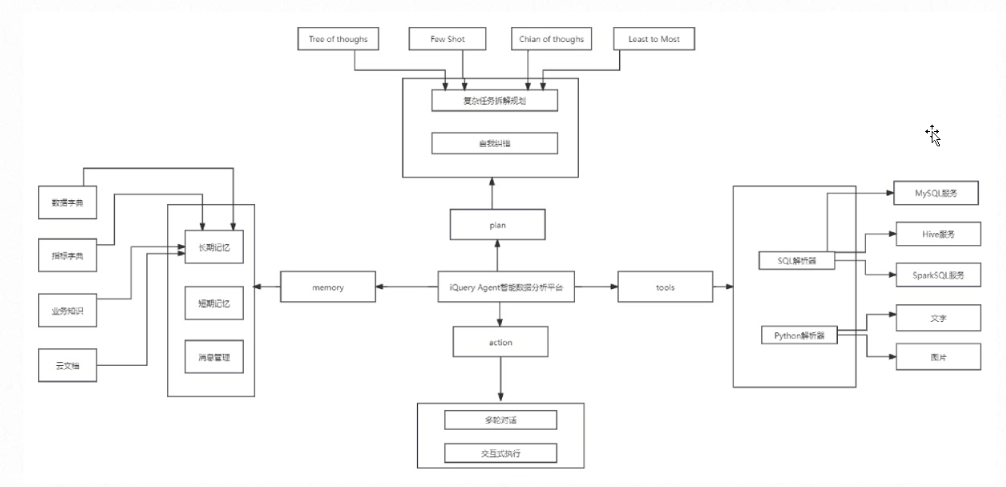
“大模型如何调用外部函数”这个话题,实际上涉及 模型与外部环境的交互机制,即“模型不只是生成文字,还能真正去执行动作”。比如,我们在开发agent时,想要从数据库中查询到数据返回给用户,而大模型是没有调用数据库的功能的,这就需要我们自己实现查询数据库函数,然后告诉大模型让它去调用这个函数,获取想要的数据。
我们可以从三个层面来理解:原理层、框架层、实践层。
一、原理层
大语言模型(LLM)本身是一个纯文本生成模型,不能直接执行计算、调用API、访问数据库等。
但是很多场景(比如天气查询、数据库问答、代码执行)需要真实世界数据或外部系统交互。
于是,人们提出了一个机制:
模型“生成函数调用指令”,外部程序“执行函数”,然后把结果反馈回模型。
这称为:
Function Calling(函数调用)
或更广义的 Tool Use(工具使用)
在OpenAI/Anthropic中也叫 Agentic LLM(具备行动能力的模型)
二、框架层
模型输出一个 JSON 格式的函数调用请求:
{
  "name": "get_weather",
  "arguments": {
    "city": "Tokyo",
    "unit": "celsius"
  }
}
外部程序收到后:
找到对应的函数
get_weather(city, unit)执行函数 → 得到结果
把结果再传回模型
模型根据结果生成最终回答
User: "今天东京的天气如何?"

 ↓
LLM 输出:
{
  "name": "get_weather",
  "arguments": {"city": "Tokyo"}
}

 ↓
外部系统执行 get_weather("Tokyo") → 返回 {"temp": 24, "condition": "Sunny"}

 ↓
LLM 接收结果并生成自然语言回答:
"东京今天晴朗,气温 24℃。"
三、实践层
实现用 Ollama(本地大模型) 来调用外部函数。这也是未来 AI 应用的主流方向之一:本地大模型 + 外部函数/插件调用,既安全又自由。
下面我会一步步教你如何在 Ollama + LangChain 环境中实现“模型自动调用外部函数(天气查询)。
用户输入 → 本地 LLM(Ollama) → 判断需要天气数据 → 调用 get_weather(city)
         ↓
   调用 OpenWeatherMap API 获取结果
         ↓
   模型用结果生成自然语言回答
本地模型(如 Llama3、Qwen2、Mistral)通过 LangChain 的 bind_tools() 调用真实函数。
获取天气API KEY
Members 在该网站注册获取api key
安装依赖
pip install langchain_community langchain_core requests python-dotenv安装ollama并下载模型
# 安装 Ollama (Linux/Mac)
curl -fsSL https://ollama.com/install.sh | sh

# 启动 ollama 服务
ollama serve

# 下载一个合适的模型,比如 Llama3 或 Qwen2
ollama pull llama3:latest
代码实现
import os
import requests
from dotenv import load_dotenv
from langchain_community.chat_models import ChatOllama
from langchain_core.tools import tool
from langchain_core.prompts import ChatPromptTemplate

# ========== 环境变量 ==========
load_dotenv()
OPENWEATHER_API_KEY = os.getenv("OPENWEATHER_API_KEY") if os.getenv("OPENWEATHER_API_KEY") else "22b7f884310fa7600b4bf47db46e6a46"  # 从 .env 加载 API key


# ========== 定义外部函数 ==========
@tool("get_weather", return_direct=True)
def get_weather(city: str) -> dict:
    """
    查询指定城市的实时天气,使用 OpenWeatherMap。
    """
    try:
        url = f"https://api.openweathermap.org/data/2.5/weather"
        params = {"q": city, "appid": OPENWEATHER_API_KEY, "units": "metric", "lang": "zh_cn"}
        resp = requests.get(url, params=params, timeout=8)
        data = resp.json()

        if data.get("cod") != 200:
            return {"error": data.get("message", "城市不存在或查询失败")}

        return {
            "city": data["name"],
            "temp": data["main"]["temp"],
            "desc": data["weather"][0]["description"],
            "humidity": data["main"]["humidity"],
            "wind_speed": data["wind"]["speed"],
        }

    except Exception as e:
        return {"error": str(e)}


# ========== 初始化本地模型 ==========
llm = ChatOllama(
    model="llama3",     # 也可换成 "qwen2"、"mistral" 等
    temperature=0.3,
)

# 将函数注册为“工具” , 可以注册多个 llm_with_tools = llm.bind_tools([get_weather, get_air_quality, recommend_travel])
llm_with_tools = llm.bind_tools([get_weather])

# ========== 构造提示模板 ==========
chat_template = ChatPromptTemplate.from_messages([
    ("system", "你是一个天气助手,必要时可使用 get_weather(city) 工具。"),
    ("human", "{user_input}")
])


# ========== 函数调用流程 ==========
def run_weather_agent(user_input: str):
    # 1️⃣ 构造消息
    messages = chat_template.format_messages(user_input=user_input)

    # 2️⃣ 让模型决定是否调用工具
    response = llm_with_tools.invoke(messages)

    # 3️⃣ 检查模型是否调用了工具
    if response.tool_calls:
        for call in response.tool_calls:
            if call["name"] == "get_weather":
                args = call["args"]
                city = args.get("city")
                print(f"模型决定调用 get_weather(city='{city}')")

                # 执行真实函数
                weather_data = get_weather(city)
                print(f"天气结果:{weather_data}")

                # 把结果发回模型进行总结
                summary_prompt = ChatPromptTemplate.from_messages([
                    ("system", "请用自然语言总结以下天气数据:"),
                    ("human", f"{weather_data}")
                ])
                summary = llm.invoke(summary_prompt.format_messages())
                return summary.content

    # 4️⃣ 如果模型没调用工具,直接返回它的回答
    return response.content


# ========== 示例运行 ==========
if __name__ == "__main__":
    question = "今天东京的天气怎么样?"
    print(f"用户:{question}")
    answer = run_weather_agent(question)
    print(f"模型:{answer}")
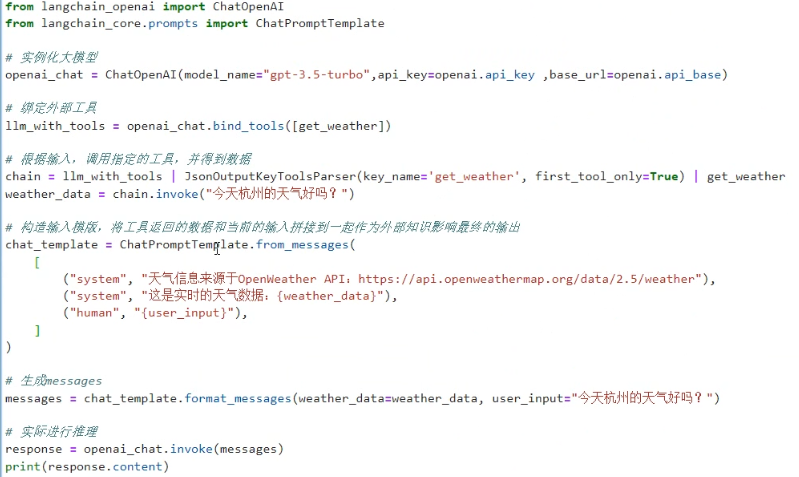
基于组合链的写法:
"""
示例:Ollama + LangChain + Chain Composition 实现函数调用
依赖:
    pip install langchain_community langchain_core requests python-dotenv
"""

import os
import requests
from dotenv import load_dotenv
from langchain_community.chat_models import ChatOllama
from langchain_core.tools import tool
from langchain_core.prompts import ChatPromptTemplate
from langchain_core.output_parsers import JsonOutputKeyToolsParser
from langchain_core.runnables import RunnablePassthrough

# ====== 环境变量 ======
load_dotenv()
OPENWEATHER_API_KEY = os.getenv("OPENWEATHER_API_KEY")


# ====== 定义外部函数 ======
@tool("get_weather", return_direct=True)
def get_weather(city: str) -> dict:
    """
    使用 OpenWeatherMap 查询指定城市天气
    """
    try:
        url = "https://api.openweathermap.org/data/2.5/weather"
        params = {"q": city, "appid": OPENWEATHER_API_KEY, "units": "metric", "lang": "zh_cn"}
        r = requests.get(url, params=params, timeout=10)
        data = r.json()

        if data.get("cod") != 200:
            return {"error": data.get("message", "查询失败")}

        return {
            "city": data["name"],
            "temp": data["main"]["temp"],
            "desc": data["weather"][0]["description"],
            "humidity": data["main"]["humidity"],
            "wind_speed": data["wind"]["speed"],
        }

    except Exception as e:
        return {"error": str(e)}


# ====== 初始化本地 LLM ======
llm = ChatOllama(
    model="llama3",  # 可换成 qwen2/mistral 等
    temperature=0.3,
)

# 绑定工具
llm_with_tools = llm.bind_tools([get_weather])


# ====== 定义调用链 ======

# 1️⃣ 第一个链:识别意图并生成工具调用
tool_chain = llm_with_tools | JsonOutputKeyToolsParser(
    key_name="get_weather", first_tool_only=True
)

# 2️⃣ 第二个链:执行外部函数
def call_weather_tool(city_query: dict):
    if not isinstance(city_query, dict):
        return {"error": "invalid argument"}
    city = city_query.get("city", "")
    return get_weather(city)

# 3️⃣ 第三个链:根据天气结果生成自然语言回答
summary_prompt = ChatPromptTemplate.from_messages([
    ("system", "你是天气助手,请根据以下天气信息为用户生成自然语言回答。"),
    ("human", "天气数据:{weather_data}")
])
summary_chain = summary_prompt | llm

# 4️⃣ 组合成完整调用链(chain composition)
weather_agent_chain = (
    {"city_query": tool_chain}
    | (lambda x: call_weather_tool(x["city_query"]))
    | (lambda result: {"weather_data": result})
    | summary_chain
)

# ====== 测试运行 ======
if __name__ == "__main__":
    user_input = "请告诉我东京现在的天气怎么样?"
    print(f"用户:{user_input}")
    result = weather_agent_chain.invoke(user_input)
    print("模型回答:", result.content if hasattr(result, "content") else result)
LangChain 内部支持 |(pipe)操作,
每个链(Chain)或函数都实现了 Runnable 接口,可自由组合。